Allows you to start a task when a command from another computer is received. Works together with the Send Command action. Performs the primary analysis of the received string and starts the corresponding task if the received string meets the specified conditions.
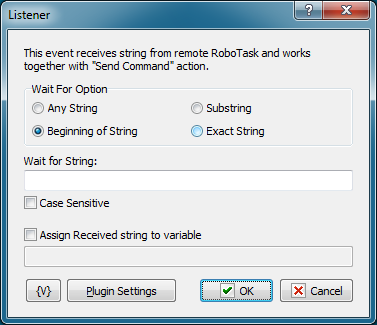
Wait For Option
Select the mode of waiting for a string.
•Any string. Any received string will start the task. For example, it is convenient if you exchange messages that should be just recorded to the log.
•Beginning of String. The received string should start with the key substring.
•Substring. The key substring can be in any position of the received string.
•Exact String. The received string must exactly match the key string.
Wait for String
Specify the key string that will start the task. This parameter does not make sense if the "Any String" mode is on.
Case Sensitive
Select this checkbox if strings should be compared with their letter case taken into account.
Assign Received String to Variable
Specify the name of the variable if the received string should be assigned to a variable. This value can be used in the task.
The simplest sample use is message exchange: the Listener receives a string, assigns it to a variable and starts the task. The task displays this variable as an informational message.
Plugin settings
You can set up parameters of Network plugin.
Variable
Allows you to add a variable to the action or triggering event that you selected. You must place the cursor in a edit box in the settings dialog window of the action or event and then click the {V} button.
 Related Topics
On Local/Remote Session Changes
WebSocket Server On HTTP Request