Runs a task. This action is useful if you want to run several tasks in a series. For example, you can create several different tasks in a series based on certain conditions that are detected in the following order:
| 1. | A task that connects to the Internet and checks the e-mail server, |
| 2. | A task that logs off if no e-mail is present, |
| 3. | A task that displays a message box if you have received e-mail. |
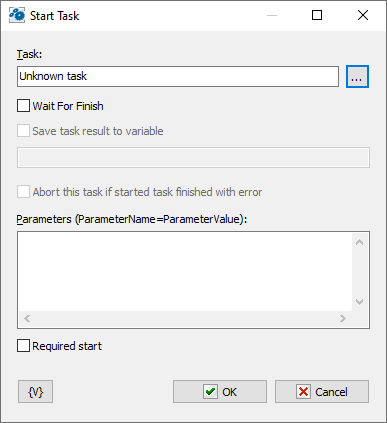
Task
Tasks can be defined in three ways:
•Explicitly – You explicitly select the task from the list of available tasks.
•By Task ID – You can specify the task ID explicitly or through a variable. You can also select the task from the list of available tasks. The Task ID is a formal number assigned to the task upon creation or import. You cannot change it.
•By external name – You can specify the External name of the task explicitly or through a variable. You can also select the task from the list of available tasks. The External name is an alternative ID for the task. You can change it at your discretion in the task editor.
The "By Task ID" and "By external name" modes are convenient for batch processing tasks in a loop (e.g., starting and stopping a group of tasks, checking the status, etc.).
Wait for Finish
Click this check box to ensure that the Start Task action starts a task and waits for completion of that task, then continues running. If the check box is clear, the action starts a task and continues running immediately.
Abort this task is started task finished with error
This parameter only makes sense when used together with the "Wait for finish" parameter. A running task may fail for various reasons, which can affect the parent task's algorithm. Therefore, it is possible to interrupt the execution of the current task.
Save task result to variable
When the action waits task for finish you can save the task result to variable. The task can return a result. To return some result, simply set the task's variable named TaskResult in the task.
Also you can retrieve the last task result anytime. Use system variable GetTaskResult(<ExtName>)
Parameters
You can pass some parameters into started task. By default, the list of parameters is empty. You need write down parameters like the text, each line should be like:
ParameterName=ParameterValue
•ParameterName – the name of parameter, any word consisting of letters and numbers;
•ParameterValue – value of parameter like any set of symbols.
You can refer to these parameters in the task as the local variables of the task. You don't need declare them in the task. Appropriate variables will appear automatically when the task is started.
Pass of parameters of a task is used when you handle errors. In this case the fixed set of parameters is passing into the task:
•LastErrorTaskID – the internal ID of the task, in which an error was raised. It is a formal identifier of a task like a number.
•LastErrorTaskName - the name of the task, in which an error was raised.
•LastErrorTaskExternalName –the External Name of the task, in which an error was raised.
•LastErrorStep – the number of the step (starting from 1), in which an error was raised.
•LastErrorCode – code of the error. There is the particular set of error codes for any type of actions (see description of actions). By default – 0.
•LastErrorDescription – the description of the error. It depends on a type of action. By default, it is the line "General error".
Required start
This parameter guarantees the start of a task. The problem is that the task can be working when you try to start it. In the most cases that doesn't matter because you need only to start the task at the appointed moment. In this case the action just sent the signal to start the task. If the task is idling, it will be started. If the task is already started, the RoboTask ignores the signal of a start because the task works by now.
But a task can be started with parameters and fulfill different actions against parameter values. Switch on this parameter if you need to ensure start up of a task when each effort to start a task. In this case the action will do efforts to start the task until a successful result.
Variable
Allows you to add a variable to the action or triggering event that you selected. You must place the cursor in a edit box in the settings dialog window of the action or event and then click the {V} button.
 Related Topics