Creates and adds files to zip files. You can use this action to back up your files. For example, you can use this action to create a task that automatically zips weekly status reports files so that they can be copied to the central server for company summary reports every month.
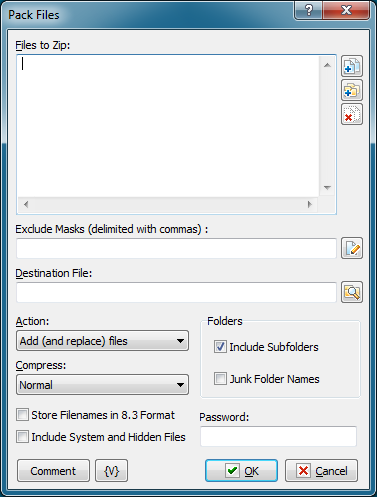
Files to Zip
Enter the files you want to add to a zip file. Wildcards are allowed. Use the Plus buttons to add files or folders to the list. To clear the list, click the X button.
Tip You can also use wildcards in this option. Some examples of wildcards are the following: •C:\Text Files\*.txt - all the files with the .txt extension in the C:\Text Files folder. •C:\Doc Files\mydoc?.doc - mydoc1.doc, mydoc2.doc, mydocA.doc, and so forth. •{bakext} - file mask(s) from the {bakext} variable.
|
Destination File
Enter the filename for the resulting .zip archive.
Action
Select one of the following actions for creating or adding to the zip file:
•Add and replace files - add all files to the archive.
•Freshen existing files - add only changed files to the archive.
•Move files - add files to the archive and remove them from the local folder.
•Update and add files - add only changed or new files to the archive.
Compress
Select one of the items on the dropdown list to determine the level of compression, or size, of the archive file:
•Maximum - creates the smallest zip file possible, while requiring the most time to create the archive.
•Normal - creates a slightly compressed zip file taking the usual amount of time to create the zip file.
•Fast - produces slightly less compression than Normal.
•Super Fast - produces an archive with even less compression than Fast and Normal.
•None - produces an archive file that is not compressed. This level of compression is the fastest.
Folders
Include Subfolders
Click this check box to include the subfolders in the archive. Files are archived with the paths stored in the archive file.
Junk Folder Names
Does not include folder paths in the archive file. For example, if you add C:\documents\*.doc, the .doc files are included into the root folder of the zip archive.
Store Filenames in 8.3 Format
Ensures that filenames are stored with the 8.3 name format, such as foo_mon.txt, especially important for FAT file systems.
Include System and Hidden Files
Archives system and hidden files in the zip file.
Password
Enter a password that is required to unzip the archive, if you want to protect the file.
Comment
Enter a memo note for the zip file.
Variable
Allows you to add a variable to the action or triggering event that you selected. You must place the cursor in a edit box in the settings dialog window of the action or event and then click the {V} button.
 Related Topics