Extracts files from an existing ZIP file to the folder that you specify. For example, you can create a task that automatically unzips files when you download .zip files to your hard drive.
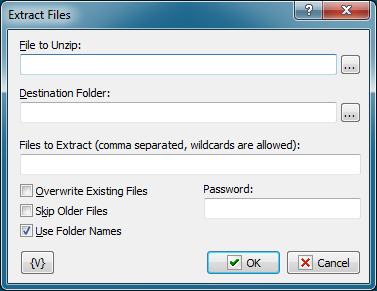
File to Unzip
Enter the name of the zip file to extract files from.
Tip You can also use wildcards in this option. Some examples of wildcards are the following: •*.txt - all the files with the .txt extension. •mydoc?.doc - mydoc1.doc, mydoc2.doc, mydocA.doc, and so forth. •*.tmp, *.$$$, *.bak - all the files with the .tmp, .$$$ and .bak extensions. •{bakext} - file mask(s) from the {bakext} variable.
|
Destination Folder
Enter the destination folder where you want to extract files.
Files to Extract
Enter the names of the files to unzip from the zip file, separated by commas. If left blank, all files are unzipped.
Overwrite Existing Files
Click to allow the extracted files to overwrite existing files with the same name.
Skip Older Files
Click to ensure the files in the zip archive are not extracted if they are older than the existing files on the local computer.
Use Folder Names
Click this check box to extract files and the directory paths that are archived in the zip file. For example, if a file is zipped with the path \temp\foo.txt, a \temp folder is created in the local directory and the foo.txt file is unzipped to that folder.
Password
Enter the password for the zip file, if the zip file is password-protected.
Variable
Allows you to add a variable to the action or triggering event that you selected. You must place the cursor in a edit box in the settings dialog window of the action or event and then click the {V} button.
 Related Topics