Moves the mouse pointer the specified distance away from the current position or to the specified point.
Please note that this action does not work in a locked session or in service mode. This is because the system ignores simulated keystrokes and mouse actions (cursor movement, button clicks) in locked sessions. This is a system security feature and cannot be changed. Therefore, if you plan to use the task independently in a system service or in a locked session, you should avoid using simulated keystrokes and mouse actions. |
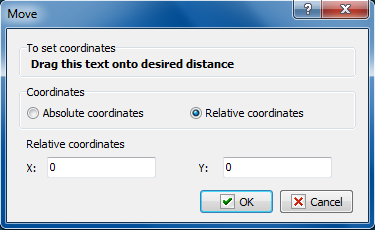
Coordinates mode
Coordinates: absolute or relative.
•Absolute coordinate - the absolute coordinates of a point on the screen will be specified in the next parameter.
•Relative coordinates - the coordinates of a point on the screen relative to the current position of the mouse pointer will be specified in the next parameter.
Absolute or Relative coordinates
The coordinates of a point where the mouse pointer should be moved. The type of coordinates is determined by the previous parameter.
In order to set the coordinates interactively, you should drag the text in the upper part of the dialog box to the necessary point on the screen. The coordinate values will be specified automatically.
 Related Topics