Executes a series of commands on files or folders on a remote server during an FTP session.
General tab
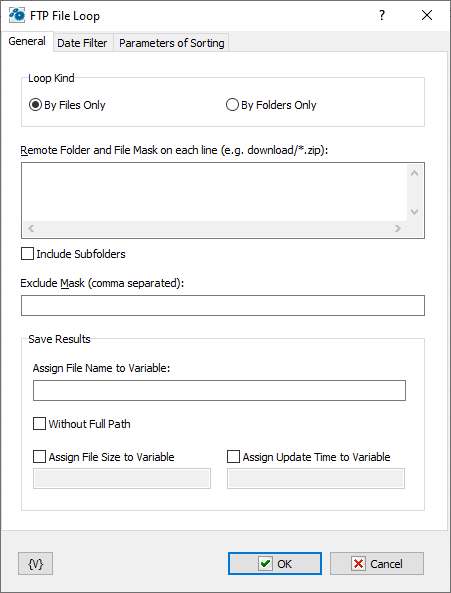
Loop Kind
Select the items you want to perform actions on: folders only, or files only.
Remote Folder
Enter the path or folder name on the remote server.
Save Results
Enter information about how you want to save the result of the file loop.
Assign File Name to Variable
Enter the name of the variable into which it is necessary to save the file name
Assign File Size to Variable
Switch on this checkbox and enter the name of the variable into which it is necessary to save the size of the file. This allows to use the file size data in other actions or tasks.
Assign Last Update Time to Variable
Switch on this checkbox and enter the name of the variable into which it is necessary to save the date and the time of the file. This allows to use the last update time information in other tasks or actions.
Datе Filter tab
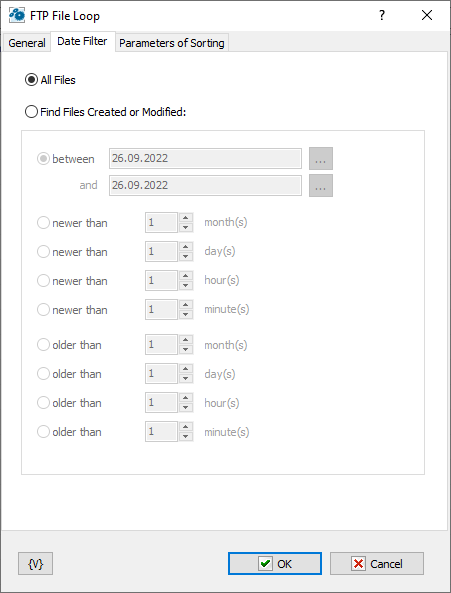
All Files
Click this option to include all files in the file loop.
Find Files Created or Modified
Enter dates and times to include files for certain time periods in the loop.
•Between – You can specify two dates explicitly selecting them from a calendar. Or you can specify the expression using variables. This expression should contain the date in the format set on your computer.
•Newer Than ___ Months
•Newer Than ___ Days
•Newer Than ___ Minutes
•Older Than ___ Months
•Older Than ___ Days
•Older Than ___ Minutes
Sorting parameters
Parameters of internal sorting of the file list
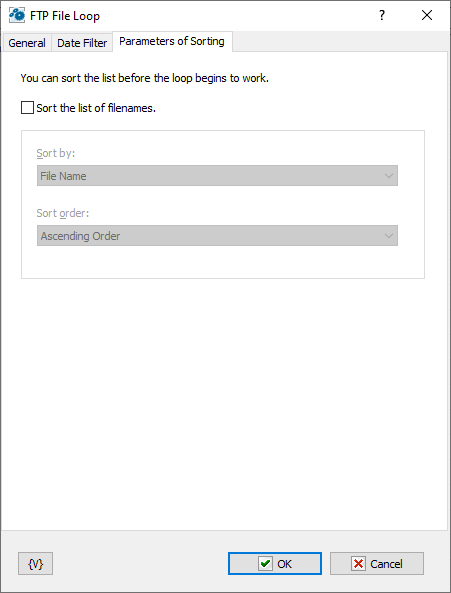
Sort the list of filenames
Turn on the checkbox if you want to sort the list
How to sort
There are four sorting modes:
•By file name
•By file time
•By file size
•By depth of nested folders
Sort order
There are two modes: ascending or descending ordering
Variable
Allows you to add a variable to the action or triggering event that you selected. You must place the cursor in a edit box in the settings dialog window of the action or event and then click the {V} button.
 Related Topics