Options > Settings

Top  Previous  Next


Allows you to set preferences for RoboTask. You can set preferences for how RoboTask starts, plug-ins, or service mode.
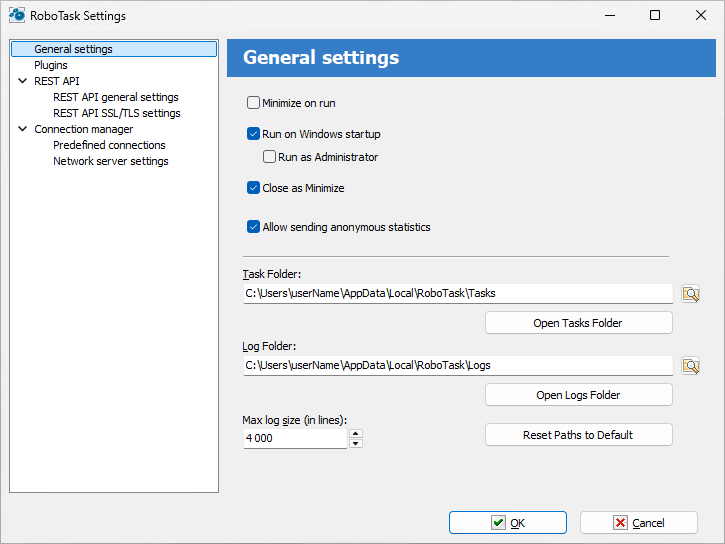
 

General tab
Plug-ins tab
NT Service tab
Network Server Tab


General tab

SettingsGeneral


Minimize on Run

Click this check box so that RoboTask is minimized when you run the software.


Run on Windows Startup

Runs RoboTask as soon as Windows starts up.


Close as Minimize

If this option is selected, when you click the X button on the main window caption, RoboTask will minimize. This is useful for preventing of casual closing of RoboTask.


Task Folder

Set the folder where you want to save tasks that you create.  You can click the browse button to select a folder.


Log Folder

Enter a folder where you want to save log files. You can click the browse button to select a folder.


Max Log Size (in Lines)

Enter how many lines of data to record in a log file. For example, if you enter 300, the log file will contain no more than 300 lines of text.
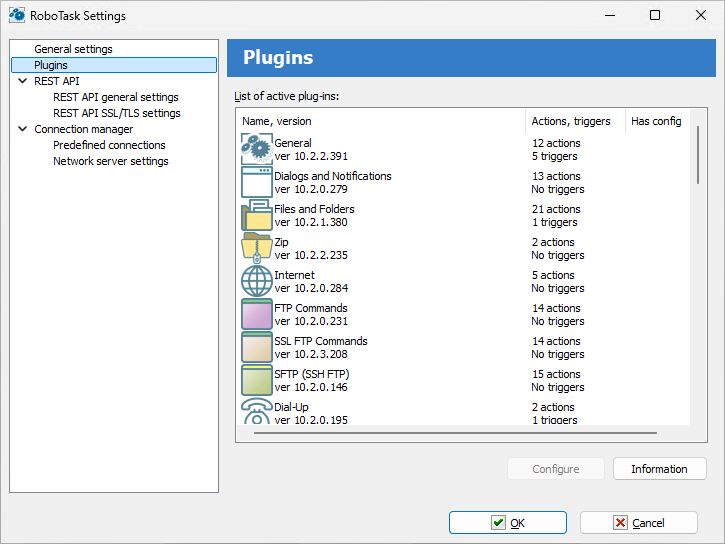
 

Plug-ins tab

SettingsPlugins


List of Active Plug-ins

Displays a list of available plug-ins for RoboTask. You can get more information when you click the Information or About buttons.


Configure

Select a plug-in from the List of Active Plug-ins box and click Configure to enter settings.


Information

Displays a list of components for the plug-in that you have selected in the List of Active Plug-ins box.


About

Displays information about the company or authors of the plug-in that you have selected in the List of Active Plug-ins box.


Service tab


On Windows NT, Windows 2000 and Windows XP you can run RoboTask as a Service. An Service is a background process that is loaded by the Service Control Manager of the Windows NT operating system. Services are usually loaded when Windows boots up, before anyone logs on.


Service mode is useful if you want to run a process in the background. However, services are background programs that run all the time and are activated automatically when Windows NT boots up. Services stop when Windows NT shuts down.

SettingsNT


When RoboTask is Running as NT Service

Allows you to specify settings when you want to run RoboTask as a Service.


Logon Process as Specified User

Select this option if you want the RoboTask log on as Specified User and get its privileges.


Domain Name

Enter the name of the domain or server whose account database contains the specified UserName account.


User Name

Enter the name of the user account to log on to.


Password

Enter the password of the user account.


Network Server tab

On this tab you can set up server parameters of RoboTask. Read more about client-server mode here.

SettingsServer


Start Server at RoboTask loading

It is on by default. Switch off this checkbox if you want to refuse from remote administration.


Port

This is the number of a port, on which the server accepts connections. By default, it is 5500. If you use more than one instance of RoboTask at your computer, apply different ports to avoid conflicts.

For example: 5500 is for an application, 5501 is for a Service.


Encrypt data

This is the mode of traffic encryption. On default, it is on. The mode of ciphering is specified by server. A client is tuned on the mode of encryption automatically. RoboTask provides the traffic encryption with dynamic keys using CryptoAPI system functions.


Compress data

This is the mode of traffic compression. By default, it is on. The mode of traffic compression can be useful when connection is slow (for example, DialUp or GPRS). The mode of traffic compression (packing) is specified by server. A client is tuned on the mode of compression automatically.


User Rights

This is the check mode of user’s rights at connection. It is possible to choose between two modes of user checking:

Use Internal list. When you press the button “Edit Internal List of Users” in this mode, you can define users, who have the right of connect to the server. This is just text in the form USERNAME=PASSWORD on every line.
For example:
admin=1234567890
At the checking of a user, the server inspects presence of the user in a list and correctness of a password.
System Administrators. In this mode the server checks presence of administrator’s rights on a local computer when a client connects.

If the user isn’t checked, the server returns an error and closes the connection.

By default, the System Administrators mode is on.


Start Server

It starts the server.


Stop Server

It stops the server. At that rate, all opened connections are closed.


View/Edit connections

Here it is possible to view all opened connections and to close selected connections.


note Related Topics

Options > View Log        

Options > View Toolbar        

Options > Variables