Use this action to run the application or open a document that you specify. If a document is specified, the application associated with the document opens it.
Run Program/Open Document is one of the most commonly-used actions in RoboTask and one of the most powerful. The most common usage is to start an application or open a document and then send keystrokes or perform other interactive actions. For example, you can use this action to open a log file in Notepad immediately after you back up your files.
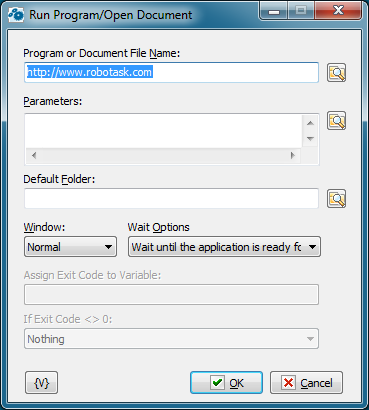
Program or Document File Name
Enter the file name of the target application or a document. If a document file is specified, the associated application is used to open it.
Parameters
Enter the parameters, if any. If the Program or Document File Name box specifies an executable file, you can specify the parameters to be passed to the application. The format of this parameter is determined by the application. If Program or Document File Name box specifies a document file, the information in the Parameters box is ignored.
Default Folder
Specifies the default folder to start the task in. If not specified, the folder of the application is used.
Window
Specifies how an application is displayed when it is opened.
Wait Options
There are three choices:
•Don't wait - the next action executes immediately after the program starts.
•Wait until the application is ready for input - the next action executes only after the program started and is ready for input. This option is useful when you want to perform any interactive actions like Send Keystrokes.
•Wait untill the application exits - the next action executes only after the program exits.
Assign Exit Code to Variable
You can assign exit code of running program to variable. This have a sense only if you set "Wait until the application exits" wait option.
If Exit Code <> 0
Usually exit code of command line utility equals to 0. Usually this means that executing of the program is OK. Non zero exit code may indicate that some problem has occurred at runtime.
You can choose one of three options:
•Nothing
•Stop the task - if exit code is non-zero RoboTask stop the task
•Raise the Error - if exit code is non-zero RoboTask rases the error with code 1 and description "Exit code is not equal to 0" (also see Error Handling)
Variable
Allows you to add a variable to the action or triggering event that you selected. You must place the cursor in a edit box in the settings dialog window of the action or event and then click the {V} button.
 Related Topics