Displays an input dialog box that lets the user enter a string and assigns the entered value to a specified variable.
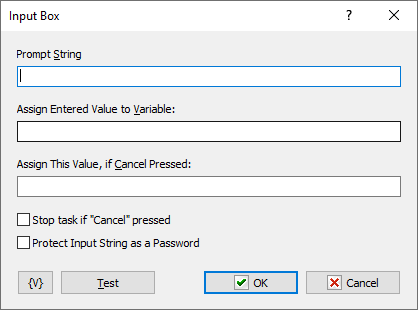
Prompt String
Specify the text that prompts the user to enter input in the edit box.
Assign Entered Value to Variable
Enter a variable name to store the entered value to; for use in other actions of task.
Assign this Value, if Cancel Pressed
Assign a default value to store if Cancel is pressed.
Variable
Allows you to add a variable to the action or triggering event that you selected. You must place the cursor in a edit box in the settings dialog window of the action or event and then click the {V} button.
Test
Click this button to ensure that the parameters for the current action work.
 Related Topics