Displays a message box with specified text and two buttons: OK&Cancel or Yes&No. For example, after your system is backed up, you can use this action to display a message asking you if you want to open the log file.
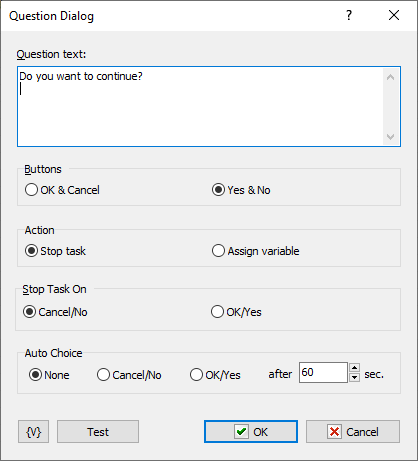
Question Text
Enter the text for the message box.
Buttons
Click to set the style of buttons that appear on the message box.
•OK & Cancel
•Yes & No
Action
Select an option to specify an action when user clicks a button:
•Stop task
•Assign variable
Stop Task On
Select an option to specify when the task stops when the user clicks a button on the message box:
•Cancel/No
•OK/Yes
Auto Choice
Click an option to specify when the task continue or stops if a user does not select a button on the message box.
•None
•Cancel/No
•OK/Yes
After ___ Sec.
Enter the number of seconds to wait before implementing the button that you selected in the Auto Choice area.
Variable
Allows you to add a variable to the action or triggering event that you selected. You must place the cursor in a edit box in the settings dialog window of the action or event and then click the {V} button.
Test
Click this button to ensure that the parameters for the current action work.
 Related Topics