Creates a text file with the specified text. For example, you can write a text file listing which user is logged into a computer at a particular time.
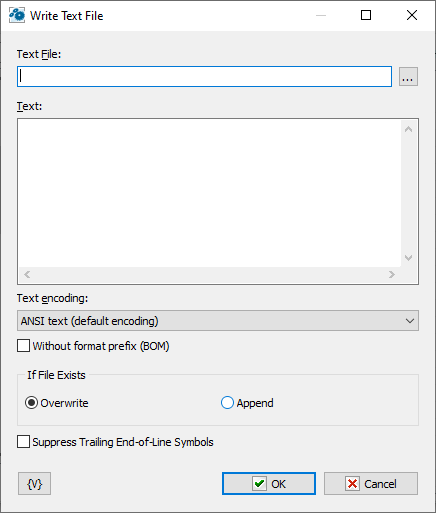
Text File
Enter the name of the text file to save. You can click the browse button to select a file.
Text
Enter the text that you want saved in the file.
Text Encoding
The action can provide the following coding:
•ANSI text
•UTF-8 text
•Unicode text
If File Exists
Specify the action to take if a file already exists in the destination location.
•Overwrite - replaces the destination file with the new file.
•Append - append specified text at the end of existing text file.
Suppress Trailing End-Of-Line symbols
If you want to remove trailing EOL symbols switch on this checkbox.
Variable
Allows you to add a variable to the action or triggering event that you selected. You must place the cursor in a edit box in the settings dialog window of the action or event and then click the {V} button.
 Related Topics