Sometimes you need to change file attributes in file operations. As a rule, the ReadOnly attribute inconveniences most of all. This action serves for changing of file attributes.
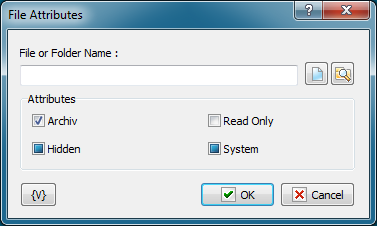
File or Folder name
Specify the name of a file or a folder. You can use buttons on the right of an edit field. A file mask is inadmissible; that is, the action can process only the specified file.
You can use variables.
Attributes
Specify the attributes, which you want to set or to remove. This action can control 4 attributes:
•Archive
•Hidden
•Read Only
•System
Please, notice that Checkboxes have three positions:
•Switched on – this means that you want to set an attribute
•Switched off – this means that you want to remove an attribute
•Grayed, or intermediate state – this means that you want to leave this attribute without changing.
By default, all the checkboxes are in Grayed state.
 Related Topics