Renames one or more specified files. Wildcards are allowed. For example, you can copy the files to another folder and automatically rename them using this action.
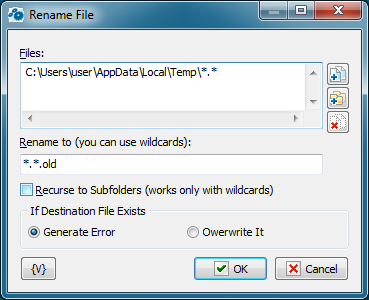
Files
Enter the files you want to rename. Use the Plus buttons to add files or folders to the list. To clear the list, click the X button.
Tip You can also use wildcards in this option. Some examples of wildcards are the following: •C:\Text Files\*.txt - all the files with the .txt extension in the C:\Text Files folder. •C:\Doc Files\mydoc?.doc - mydoc1.doc, mydoc2.doc, mydocA.doc, and so forth. •{bakext} - file mask(s) from the {bakext} variable.
|
Rename To
Enter the name or partial name for the new filename. You can use a wildcard if you want to rename part of the filename.
Recurse to Subfolders
Renames the files in the subfolders of the current directory.
Variable
Allows you to add a variable to the action or triggering event that you selected. You must place the cursor in a edit box in the settings dialog window of the action or event and then click the {V} button.
 Related Topics