This action is used to sort strings in a text or in a text file in the ascending or descending order. It is possible to assign the sorted text to a variable for further processing (e.g. in "Text Loop") or save it to a file. You can specify the source text explicitly using variables or read it from an external file.
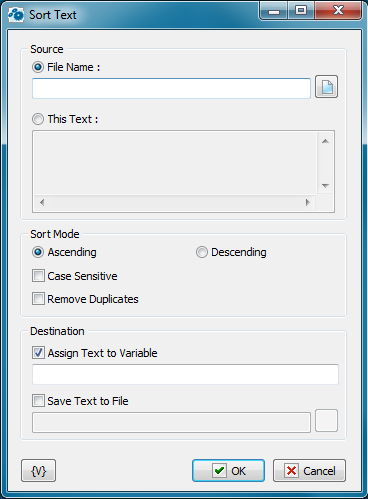
Source
You can select the source for the source text in this group of parameters: specify an external file or specify the text explicitly.
File Name – specify the full file name either manually or using the Open File dialog box by clicking the button to the right from the field. It is possible to use RoboTask variables.
This text – if you want to specify the text explicitly, fill the text field manually. It is possible to use variables in the text. RoboTask will replace them with variable values during the action.
Sort Mode
You can specify the string sorting mode in this group
•Ascending or Descending
•Case Sensitive
•Remove duplicates - this allows to keep only unique lines in the text.
Destination
Select at least one of the variants (or both at once) :
Assign text to Variable – specify the name of the custom variable the sorted text will be assigned to. It is impossible to use variables.
Save text to File – specify the full file name either manually or using the Open File dialog box. It is possible to use RoboTask variables.
Variable
Allows you to add a variable to the action or triggering event that you selected. You must place the cursor in a edit box in the settings dialog window of the action or event and then click the {V} button.
 Related Topics